|   |
| |
In this issue:
Foothold EXPO
Impact Prize
FootholdConnect Events
AWARDS Certification
Highlights from the Project Pipeline
This Month in HMIS
Tip of the Month - Searching Online Help
Foothold News & Blog

June 22, 2017 marked Foothold Technology's tenth annual user's conference - Expo TEN. Foothold clients from across the country headed to NYU's Kimmel Center in lower Manhattan for a day rich with thought, learning, networking, and even a few games. To see photos, presentations, and learn more about Expo TEN, click here.
Return to the top of the page.
Congratulations to our 2017 Impact Prize winners!
To learn more about the Impact Prize, click here. Next year's call for nominations will be released in early 2018.
Return to the top of the page.
For more information on upcoming FootholdConnect events, please go to FootholdConnect on the AWARDS Home screen's navigation bar, or visit the Upcoming Events page of the Foothold Technology web site.
And don't forget... If you've missed any recent FootholdConnect events, you can access the recordings for those in Online Help here!
Return to the top of the page.
Save the Dates! We are excited to announce the next round of AWARDS Certification is right around the corner!
The Basic Course (Level 1) will be in the fall (September 26th - September 28th), the Intermediate Course (Level 2) in the winter (January 23rd - January 25th), and the Master Course (Level 3), in the spring (March 27th - March 29th). Each course will be three days long.
The 100 question Qualifying Exam is available here. There is no cost for the Qualifying Exam, and no obligation to enroll in Certification if you take the exam.
If you have any questions, email [email protected]
Return to the top of the page.
Highlights from the Project Pipeline
Home Screen: Menu Fly-Outs
As part of the redesign of AWARDS, the next update to the Home screen will be released this fall. This update will add menu fly-outs to the Charts modules, replacing the module menu pages. Each module within Charts, when clicked, will open a menu containing all features located within the module. Clicking on a feature will then take the user directly to the next screen in the workflow, be it an index, settings page, client selection page, etc.
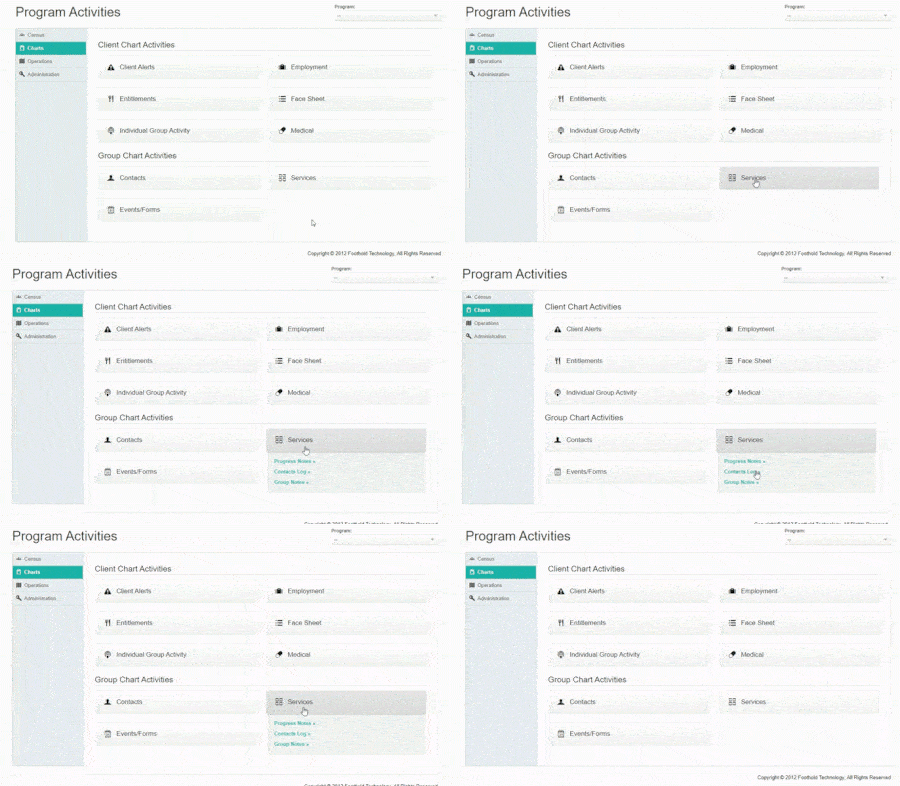
Since these fly-out listings replace the menu pages, new Program and Roster Archive options will be added to the Home screen. A new Reports button will also be added to the top navigation bar, for users to access the report mode previously set on the menu pages.
Further communication and resources will be made available prior to deployment.
Diagnoses Update - Start Preparing Today!
As we continue to enhance the look and feel of AWARDS, work on moving the Diagnosis module to the new index style is currently underway. With these transitions, ICD-10 codes will be the expected code documented on diagnosis records in this newly updated module.
In preparation for the Diagnosis update, codes that are not yet moved into ICD-10 should be reviewed prior to the deployment for a seamless transition. Specifically, the following actions are recommended:
Click here for detailed information on the transition process for ICD-10 - Transitioning to DSM-5 / ICD-10.
For agencies with access to the ImportTool feature, the Diagnosis ImportTool has been updated to allow you to update these records in a batch. The tool can be used to insert Resolution Dates where needed, and create new ICD-10 records as well. The "Foothold Report - Diagnosis Audit without Disabilities" saved format in the Diagnosis ReportBuilder can assist in gathering the information needed for the import file, or as an audit to see which records need updating.
If you're interested in learning more about the ImportTool, please contact your Client Services representative.
Once this update is deployed, these records (the DSM-IV and ICD-9 records) will only be available in reports.
We expect to release the new design in late summer and will be providing further communications and resources prior to the deployment date.
HMIS Consent Forms
Client consent forms in HMIS databases will be changing in the next month or two. The forms are going to be customizable and include new sharing options. HMIS System Administrators are being contacted to find out how they would like their consent forms to look and what sharing options they want to give clients. These new consent forms can also be electronically signed if desired.
Return to the top of the page.
HUD's 2017 Data Standards changes go into effect on October 1st. This month we wanted to give everyone a heads up about which data elements are being removed on October 1st so that you have time to save any data that you might need.
More information about the Data Standards changes and training dates will be announced next month.
Return to the top of the page.
Tip of the Month - Searching Online Help
Did you know... that AWARDS Online Help is fully searchable? To conduct a search click the Search tab in the upper-left corner of the Help system.
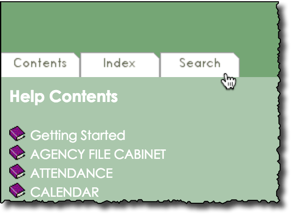
Next, enter the word or phrase of your choice, and then click Go to initiate the search. Results will then be displayed on the right-hand side of the Help page. Clicking any result will take you directly to the corresponding Help content, where exact matches will be highlighted for you. To return to the search results (if needed), use your browser�s jump back button.
When conducting Help searches, keep in mind that:
For more information on searching, and on using Online Help in general, click here.
Check out the latest in Foothold news and recent entries from the Foothold blog!
Return to the top of the page.
https://demodb.footholdtechnology.com/help/?12132
